
Loops are a useful programming construct that allows you to repeat a block of code a certain number of times, or until a certain condition is met. In this tutorial, we’ll cover the two most common types of loops in JavaScript: for loops and while loops.
for Loops
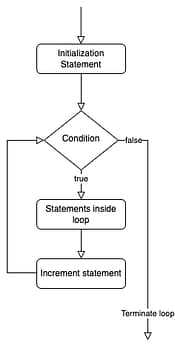
for loops are a type of loop that allows you to specify the number of times the loop will run. Here is the syntax for a for loop in JavaScript:
for (initialization; condition; increment) {
  // code to be executed
}
Let’s break down each part of the for loop:
initialization: This is the starting point of the loop. It is executed only once before the loop begins. This is where you would typically initialize a counter variable.condition: This is a boolean expression that is evaluated before each iteration of the loop. If the condition istrue, the loop will continue to run. If the condition isfalse, the loop will exit.increment: This is a statement that is executed at the end of each iteration of the loop. It is typically used to update the counter variable.
Here is an example of a for loop that prints the numbers from 1 to 10:
for (let i = 1; i <= 10; i++) {
  console.log(i);
}
This for loop will initialize the variable i to 1, and then run the loop as long as i is less than or equal to 10. After each iteration of the loop, i will be incremented by 1.
while Loops
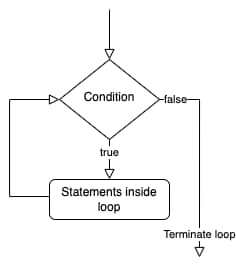
while loops are a type of loop that allows you to repeat a block of code as long as a certain condition is true. Here is the syntax for a while loop in JavaScript:
while (condition) {
  // code to be executed
}
The while loop will continue to run as long as the condition is true. It is important to make sure that the condition will eventually become false, or the loop will run indefinitely (also known as an infinite loop).
Here is an example of a while loop that prints the numbers from 1 to 10:
let i = 1;
while (i <= 10) {
  console.log(i);
  i++;
}
This while loop will run as long as i is less than or equal to 10. After each iteration of the loop, i will be incremented by 1.
Practice Exercise
- You are working on a web application that displays a list of products on a page. The list of products is stored in an array called
products. You need to loop through the array and display the name and price of each product on the page. Write aforloop that accomplishes this task. - You are building a web game that generates a random number between 1 and 10. The player has to guess the number within 3 tries. Write a
whileloop that allows the player to enter their guess and displays a message telling them if they are correct or not. If the player guesses the correct number or runs out of tries, the loop should exit. - You are working on a JavaScript library that provides utility functions for working with arrays. One of the functions you are writing is called
findLargestNumber, which takes an array of numbers as an argument and returns the largest number in the array. Write aforloop that iterates through the array, keeping track of the largest number as it goes. - You are building a web application that allows users to enter a list of tasks they need to complete. The tasks are stored in an array called
tasks. You need to write awhileloop that prompts the user to enter a new task and adds it to thetasksarray. The loop should exit when the user enters an empty string.
In this tutorial, we learned about the two most common types of loops in JavaScript: for loops and while loops. We also learned about the syntax and usage of these loops, as well as how to avoid infinite loops.
I hope this tutorial was helpful! Let me know if you have any questions.