
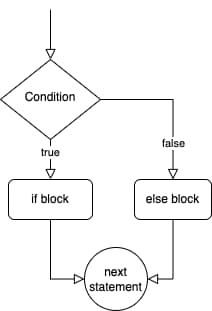
In programming, we often want to execute certain code only if a certain condition is met. This is where conditional statements come in. They allow us to specify a block of code to be executed if a condition is true, and another block of code to be executed if the condition is false.
The if Statement
The most basic form of a conditional statement is the if statement. It has the following syntax:
if (condition) {
  // code to be executed if condition is true
}
Here’s an example of an if statement in action:
let age = 25;

if (age > 18) {
  console.log("You are an adult!");
}
In this example, the code block inside the if statement will be executed because the value of age is greater than 18, which means the condition age > 18 is true.
The else Statement
Sometimes, we want to specify a block of code to be executed if the condition is false. We can do this using the else statement. It has the following syntax:
if (condition) {
  // code to be executed if condition is true
} else {
  // code to be executed if condition is false
}
Here’s an example that uses an if statement and an else statement:
let age = 15;

if (age > 18) {
  console.log("You are an adult!");
} else {
  console.log("You are not an adult yet!");
}
In this example, the code inside the else block will be executed because the value of age is not greater than 18, which means the condition age > 18 is false.
The else if Statement
Sometimes, we want to specify multiple conditions and execute different code blocks based on which condition is true. We can use the else if statement for this. It has the following syntax:
if (condition1) {
  // code to be executed if condition1 is true
} else if (condition2) {
  // code to be executed if condition1 is false and condition2 is true
} else {
  // code to be executed if condition1 and condition2 are false
}
Here’s an example that uses an if statement, an else if statement, and an else statement:
let age = 25;

if (age < 18) {
  console.log("You are a minor.");
} else if (age >= 18 && age < 65) {
  console.log("You are an adult.");
} else {
  console.log("You are a senior citizen.");
}
In this example, the code inside the else if block will be executed because the value of age is greater than or equal to 18 and less than 65, which means the condition age >= 18 && age < 65 is true.
Practice Exercise
- I am building a form that requires users to input their ages. How can I use a
ifstatement to show a different message to users who are over the age of 18 than to those who are under 18? - I am building a game that has different levels. How can I use a
ifstatement to show a different set of instructions to the user depending on which level they are on? - I am building a website that needs to display different content to users depending on their location. How can I use a
ifstatement to check the user’s location and display the appropriate content? - I am building a shopping cart feature for an e-commerce website and want to offer free shipping to users who spend over a certain amount. How can I use an
ifstatement to check the total value of the items in the user’s shopping cart and offer free shipping if the value is over a certain threshold?
In this tutorial, we learned about conditional statements in JavaScript, including the if statement, the else statement, and the else if statement. We also